MiniTrekMOCs
  • Home
  • Shop
    • Bundles
    • Models
    • Shuttles
    • Advent Calendars
    • Tales of Trek
    • Gift Cards
  • Galleries
    • Collection
    • Shuttles
  • About
    • FAQ
    • Brand
    • Stickers
    • Change Log
  • Contact
  • Home
  • Shop
    • Bundles
    • Models
    • Shuttles
    • Advent Calendars
    • Tales of Trek
    • Gift Cards
  • Galleries
    • Collection
    • Shuttles
  • About
    • FAQ
    • Brand
    • Stickers
    • Change Log
  • Contact
Search


STICKERS
A MiniTrekMOCs How-To Guide
​

Two Dimensional Thinking...

Every MOC builder has a different method for attaching stickers to their models, all varying in cost and crafting skills required to execute. For the custom labels for each of my models, the process I've outlined tries to accomplish four goals:
  • Make it inexpensive
  • Make it easy
  • Make it look great
  • Make it durable
What I've detailed below may not be the best methodology for smaller stickers, or a larger MOC layout. But, for regularly placing labels on black 2x4 tiles, it seems to do the trick!
Picture

Picture

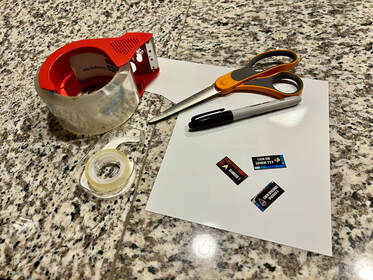
Required Materials

  • At-home printer
  • Matte photo paper
  • Scissors or craft knife
  • Black permanent marker
  • Clear shipping/packing tape
  • Double-sided tape (temporary or permanent)

Step-by-Step Guide

  1. Print the image* on your printer with matte photo paper.
  2. Cut it out the label.
  3. Using a black permanent marker, carefully color the edge of the label. 
  4. Lay the label down face up, and place a strip of clear shipping/packing tape sticky side down onto the label. Press gently across the top of the label to smooth out any bubbles or air gaps.
  5. Cut out the label from the packing tape.
  6. Using temporary or permanent double-sided tape, place the tape onto the label, and then place the sticker onto  the 2x4 tile. 

* I supply a PDF and PNG version of each model's label. If you want to print multiple at once to save on paper, you will have to resize the images on a Word / Pages document. The exact dimensions of a 2 x 4 tile is 1.25” x 0.62”, so you can use that to resize. 

Sticker Paper

If you want a little shortcut, I would highly recommend this sticker paper from Amazon. However, I still strongly recommend using the above method of packing tape to protect the sticker, even after printing it on specialized sticker paper. This will prevent ink from rubbing off and scratches from forming on the easily-scratched surface of the glossy paper!

Have more questions?

Contact Me!
HOME
SHOP
Models
Bundles
​Shuttles
Advent Calendars
​
​Tales of Trek
Gift Cards
GALLERIES
Collection
Shuttles
ABOUT
FAQ
Brand
Stickers
Change Log

Picture
GET IN TOUCH
[email protected]
Picture
Picture
Get Email Updates!
Picture
2026 © MiniTrekMOCs, all rights reserved.
The products on this website and its associated designs, creations, or content are not affiliated with, endorsed, sponsored, or approved by Star Trek, its licensors, or the LEGO® Group. Star Trek and related trademarks are the property of CBS Studios Inc. and are used under "fair use" principles. The site and products are fan-made creations and are intended solely for the purpose of artistic expression, entertainment, and personal enjoyment. No copyright or trademark infringement is intended or implied.
​LEGO® is a trademark of the LEGO® Group, which does not sponsor, authorize, or endorse this website, its products, or its associated designs.

All content, designs, and creations presented on this website are the intellectual property of MiniTrekMOCs and may not be reproduced, distributed, or used for commercial purposes without prior written consent. By accessing this website or using any of its content, you acknowledge and agree to these terms and disclaimers.

  • Home
  • Shop
    • Bundles
    • Models
    • Shuttles
    • Advent Calendars
    • Tales of Trek
    • Gift Cards
  • Galleries
    • Collection
    • Shuttles
  • About
    • FAQ
    • Brand
    • Stickers
    • Change Log
  • Contact